Say the reply naturally
Capture the answer while it is fresh. You can speak the intent, tone, and details without leaving the email thread.
Speak the reply you want to send. Vida drafts from the open Gmail thread, then inserts the text so you can edit and send from Gmail.
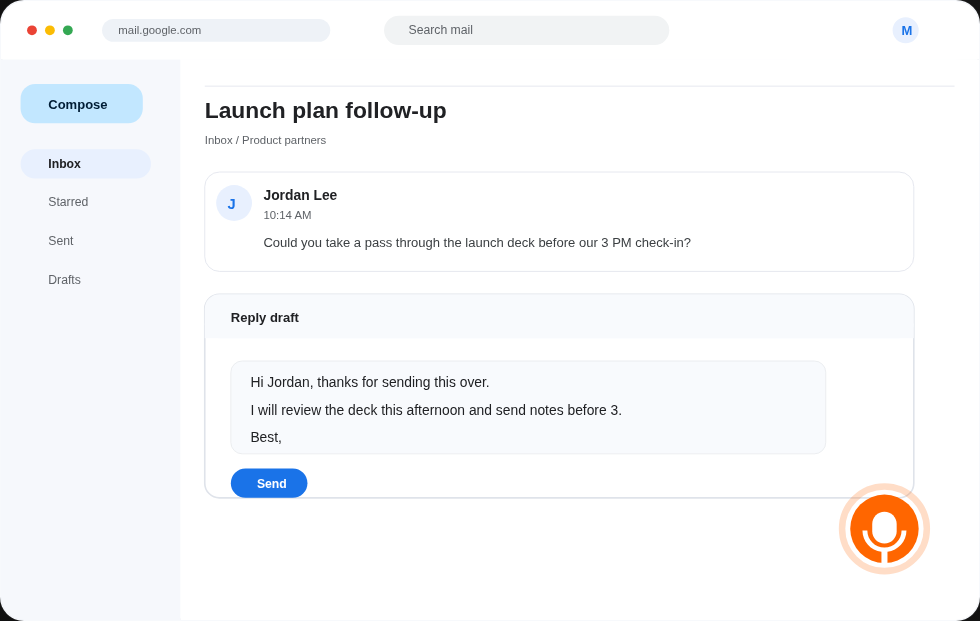
Plain speech-to-text gives you words. Vida is focused on Gmail replies, so this dictation for Gmail extension uses the open thread as context and turns your spoken note into a draft you can still control.
Capture the answer while it is fresh. You can speak the intent, tone, and details without leaving the email thread.
Vida drafts with the current conversation in view, so the reply is shaped for that specific email instead of a blank note.
The draft is yours to edit. Vida inserts text only after you choose it, and you send manually from Gmail.
The workflow stays inside Gmail, so the path from thought to reply is short and easy to check.
Start from the message you need to answer. Vida works from the email thread you are already reading.
Use the Vida microphone button to dictate the reply in your own words, including the point you want to make and any detail the recipient needs.
Vida shows the draft for review first. You can edit it, insert it into the compose box, and send it yourself from Gmail.
Vida is for people who know the answer but lose time turning it into a polished Gmail reply. It keeps the speed of dictation without taking away final judgment.
Vida drafts replies. It does not send email automatically, and it does not replace your review step.
Vida is currently available for one Gmail user at $0 to start while the product is in early access.
Built for inbox-heavy Gmail users who know what they want to say but lose time typing replies.
Start with one Gmail account, speak a reply, review the draft, and keep sending from Gmail like you do today.
Install for Gmail